2026年5月,Spring AI 1.0.0 正式版终于发布了。这不仅是版本号的“转正”,更意味着一个生产级、模块化、可扩展的 Java AI 应用开发框架已经成熟。与早期 0.8.x 的碎片化不同,1.0 统一了 API 抽象、完善了函数调用(Function Calling)机制、内置了完整的 RAG 工作流,并提供了与主流向量数据库的无缝集成。本文将带你从零构建一个“企业知识库问答系统”,把内部 PDF/Word 文档变成可对话的智能知识库。
一、Spring AI 1.0 核心架构:不再只是“LLM 的薄封装”
Spring AI 1.0 的架构分为四个清晰层次:
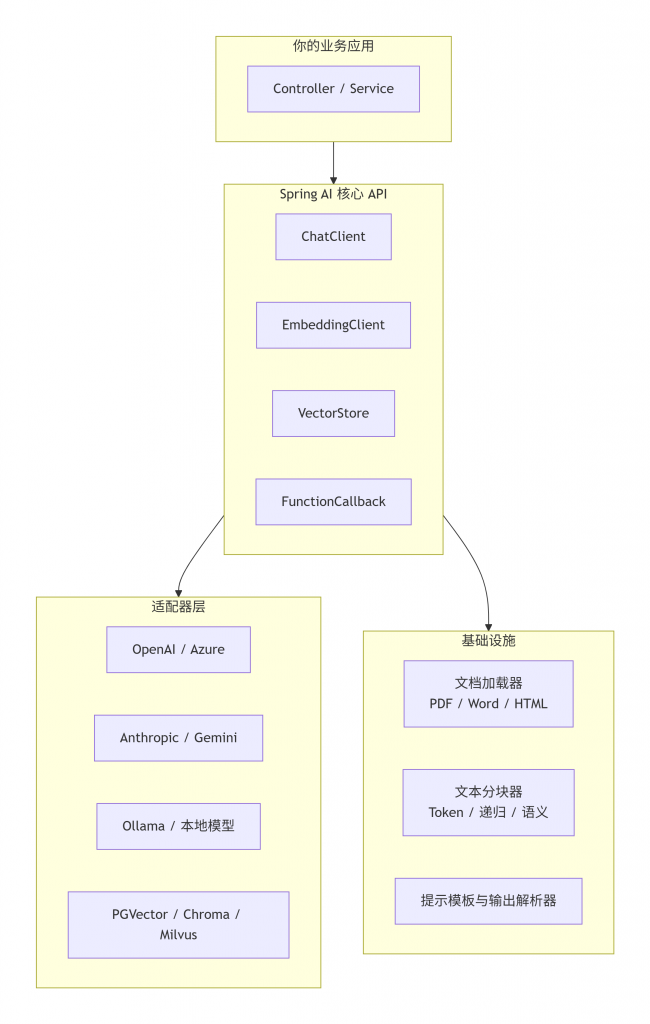
与早期版本最大的不同在于:
- 统一
ChatModel和EmbeddingModel,不再区分OpenAiChatModel和AzureOpenAiChatModel的差异,通过ModelOptions统一配置。 FunctionCallback成为一等公民,允许 LLM 在推理过程中调用任意 Java 方法,打通 AI 与业务系统的“最后一公里”。VectorStore接口标准化,支持 CRUD、相似性检索和元数据过滤,切换向量数据库只需改依赖和配置。
二、从零搭建知识库问答系统:完整实战
我们的目标是:上传一份公司内部《技术规范手册》(PDF),用户提问后,系统自动从手册中检索相关段落,结合 LLM 生成准确回答,且答案能引用来源文档。
技术选型:
- 向量数据库:PGVector(PostgreSQL 扩展,运维友好)
- 嵌入模型:Ollama 部署的 nomic-embed-text(本地免费)
- 大语言模型:Ollama 的 qwen2.5:7b(或切换至云端 GPT-4.1)
- 框架:Spring Boot 3.4 + Spring AI 1.0.0
2.1 项目依赖(Maven)
<parent>
    <groupId>org.springframework.boot</groupId>
    <artifactId>spring-boot-starter-parent</artifactId>
    <version>3.4.2</version>
</parent>

<properties>
    <spring-ai.version>1.0.0</spring-ai.version>
</properties>

<dependencies>
    <!-- Spring AI 核心 -->
    <dependency>
        <groupId>org.springframework.ai</groupId>
        <artifactId>spring-ai-core</artifactId>
        <version>${spring-ai.version}</version>
    </dependency>
    <!-- Ollama 支持 -->
    <dependency>
        <groupId>org.springframework.ai</groupId>
        <artifactId>spring-ai-ollama-spring-boot-starter</artifactId>
        <version>${spring-ai.version}</version>
    </dependency>
    <!-- PGVector 支持 -->
    <dependency>
        <groupId>org.springframework.ai</groupId>
        <artifactId>spring-ai-pgvector-store-spring-boot-starter</artifactId>
        <version>${spring-ai.version}</version>
    </dependency>
    <!-- 文档加载器:PDF / Word -->
    <dependency>
        <groupId>org.springframework.ai</groupId>
        <artifactId>spring-ai-document-readers</artifactId>
        <version>${spring-ai.version}</version>
    </dependency>
    <!-- JDBC 驱动(PG) -->
    <dependency>
        <groupId>org.postgresql</groupId>
        <artifactId>postgresql</artifactId>
        <scope>runtime</scope>
    </dependency>
</dependencies>
2.2 配置文件(application.yml)
spring:
  datasource:
    url: jdbc:postgresql://localhost:5432/knowledge_db
    username: postgres
    password: example
  ai:
    ollama:
      base-url: http://localhost:11434
      chat:
        options:
          model: qwen2.5:7b
          temperature: 0.7
      embedding:
        options:
          model: nomic-embed-text
    vectorstore:
      pgvector:
        index-type: HNSW
        distance-type: COSINE_DISTANCE
        dimensions: 768          # nomic-embed-text 的向量维度
        schema-name: public
        vector-table-name: documents
2.3 文档预处理:加载 → 分块 → 向量化 → 存储
我们编写一个 DocumentIngestionService,负责将上传的文件导入向量库。
import org.springframework.ai.document.Document;
import org.springframework.ai.document.reader.pdf.PdfDocumentReader;
import org.springframework.ai.document.reader.docx.DocxDocumentReader;
import org.springframework.ai.document.splitter.TokenTextSplitter;
import org.springframework.ai.embedding.EmbeddingClient;
import org.springframework.ai.vectorstore.VectorStore;
import org.springframework.stereotype.Service;
import org.springframework.web.multipart.MultipartFile;

import java.io.IOException;
import java.util.List;

@Service
public class DocumentIngestionService {

    private final VectorStore vectorStore;
    private final EmbeddingClient embeddingClient;

    public DocumentIngestionService(VectorStore vectorStore, EmbeddingClient embeddingClient) {
        this.vectorStore = vectorStore;
        this.embeddingClient = embeddingClient;
    }

    public void ingestFile(MultipartFile file) throws IOException {
        // 1. 根据文件类型选择读取器
        var reader = file.getOriginalFilename().endsWith(".pdf") ?
                new PdfDocumentReader(file.getInputStream()) :
                new DocxDocumentReader(file.getInputStream());

        // 2. 加载文档(自动提取文本和元数据)
        List<Document> documents = reader.read();

        // 3. 分块(每个块 500 token,重叠 50 token)
        var splitter = new TokenTextSplitter(500, 50, true);
        List<Document> chunks = splitter.apply(documents);

        // 4. 为每个分块生成 embedding(自动调用 embeddingClient)
        //    Spring AI 的 VectorStore 会在存储时自动调用 embed,也可以手动预计算
        //    这里我们显式调用 embedding 以便打印日志
        chunks.forEach(doc -> {
            var embedding = embeddingClient.embed(doc.getText());
            doc.setEmbedding(embedding);
        });

        // 5. 存入 PGVector
        vectorStore.add(chunks);
        System.out.println("✅ 已入库 " + chunks.size() + " 个分块");
    }
}注意:Spring AI 1.0 的
VectorStore#add会自动调用配置的EmbeddingClient,所以第 4 步可以省略。但显式调用可以让日志更清晰。
2.4 RAG 检索增强生成:核心问答接口
RAG 的核心流程是:用户问题 → 向量检索 → 上下文拼装 → LLM 生成。
import org.springframework.ai.chat.ChatClient;
import org.springframework.ai.chat.prompt.Prompt;
import org.springframework.ai.chat.prompt.SystemPromptTemplate;
import org.springframework.ai.document.Document;
import org.springframework.ai.vectorstore.VectorStore;
import org.springframework.ai.vectorstore.SearchRequest;
import org.springframework.stereotype.Service;

import java.util.List;
import java.util.stream.Collectors;

@Service
public class RagService {

    private final VectorStore vectorStore;
    private final ChatClient chatClient;

    public RagService(VectorStore vectorStore, ChatClient chatClient) {
        this.vectorStore = vectorStore;
        this.chatClient = chatClient;
    }

    public String ask(String question) {
        // 1. 向量检索:topK=5,相似度阈值 0.75
        var request = SearchRequest.builder()
                .query(question)
                .topK(5)
                .similarityThreshold(0.75)
                .build();
        List<Document> relevantDocs = vectorStore.similaritySearch(request);

        // 2. 提取文本并拼接上下文
        String context = relevantDocs.stream()
                .map(doc -> "【来源:" + doc.getMetadata().get("source") + "】\n" + doc.getText())
                .collect(Collectors.joining("\n---\n"));

        // 3. 构造增强提示词
        String systemPromptTemplate = """
                你是一个专业的技术文档问答助手。请根据以下参考资料回答问题。
                如果参考资料中找不到答案,请明确说“资料中没有相关信息”,不要编造。

                参考资料:
                {context}
                """;
        var systemPrompt = new SystemPromptTemplate(systemPromptTemplate)
                .createMessage(Map.of("context", context));

        var userMessage = new UserMessage(question);

        // 4. 调用 LLM
        var prompt = new Prompt(List.of(systemPrompt, userMessage));
        var response = chatClient.call(prompt);

        return response.getResult().getOutput().getText();
    }
}
2.5 暴露 REST API
@RestController
@RequestMapping("/api/qa")
public class QaController {

    private final RagService ragService;
    private final DocumentIngestionService ingestionService;

    @PostMapping("/ask")
    public String ask(@RequestParam String question) {
        return ragService.ask(question);
    }

    @PostMapping("/upload")
    public String upload(@RequestParam MultipartFile file) throws IOException {
        ingestionService.ingestFile(file);
        return "文件已导入,分块数量:" + ...;
    }
}
三、函数调用(Function Calling):让 LLM 操作你的业务系统
RAG 让 LLM 读取内部知识,但无法执行动作。函数调用弥补了这个缺口——你可以暴露 Java 方法,让 LLM 在对话中决定调用它们。
业务场景:用户问“最近三天有没有关于‘虚拟线程’的文档更新?”系统需要查询数据库的变更日志,然后回答。
第一步:定义函数回调
import org.springframework.ai.model.function.FunctionCallback;
import org.springframework.stereotype.Component;

import java.time.LocalDate;
import java.util.List;

@Component
public class DocumentUpdateFunction implements FunctionCallback<DocumentUpdateFunction.Request, DocumentUpdateFunction.Response> {

    public record Request(String keyword, Integer days) {}
    public record Response(List<String> updatedFiles) {}

    @Override
    public String getName() {
        return "queryDocumentUpdates";
    }

    @Override
    public String getDescription() {
        return "查询最近 N 天内包含特定关键词的文档更新列表。参数:keyword(关键词),days(天数)";
    }

    @Override
    public Response apply(Request request) {
        // 实际业务:查询数据库或审计日志
        var result = auditLogService.findUpdatedDocs(request.keyword, request.days);
        return new Response(result);
    }
}
第二步:注册到 ChatClient
在配置中注册该 Function,并在 Prompt 中通过 options 启用它。
@Configuration
public class AiConfig {
    @Bean
    public ChatClient chatClient(ChatModel chatModel, DocumentUpdateFunction updateFunction) {
        return ChatClient.builder(chatModel)
                .defaultFunctions(updateFunction)
                .build();
    }
}
之后,用户提问“最近三天有没有虚拟线程的文档更新?”时,LLM 会自动调用 queryDocumentUpdates 函数,将返回的结果组织成自然语言回答。整个过程无需你编写任何条件判断代码。
延伸阅读:本站的 《Spring AI + Ollama:本地运行 LLM 生成 SQL 语句》 和 《用 AI 生成复杂 SQL:LangChain4j + 本地模型实践》 分别展示了早期版本中 AI 与 SQL 的结合。Spring AI 1.0 的函数调用机制让这类交互更标准化,可维护性更强。
四、向量数据库选型与对比
Spring AI 1.0 支持主流向量数据库,下表是它们的特点:
| 向量数据库 | 集成方式 | 优势 | 适用场景 |
|---|---|---|---|
| PGVector | Spring Data JPA | 与 PostgreSQL 共用,运维简单,ACID 保证 | 中小规模,团队熟悉 PG |
| Chroma | 嵌入式 HTTP 服务 | 轻量,无外部依赖,Python 生态友好 | 开发测试,原型验证 |
| Elasticsearch | 已有 ES 集群 | 全文检索+向量混合查询 | 已有 ES 基础设施,需混合搜索 |
| Milvus | 独立服务 | 分布式,支持 GPU 加速,超大规模 | 百万级以上向量,生产级高性能 |
对于大多数 Java 后端团队,PGVector 是首选——无需引入新组件,备份恢复、监控工具都能复用,学习成本最低。
五、生产环境最佳实践
5.1 分块策略
- 固定大小(Token)分块:简单,但可能切断语义
- 递归分块:按段落/标题递归,保持语义完整性
- 推荐:
RecursiveCharacterTextSplitter(Spring AI 1.0 提供),先按换行、句号、逗号递归切分,再限制最大长度。
5.2 嵌入缓存
相同文本重复嵌入成本高昂。可用本地缓存(Caffeine)或 Redis 缓存嵌入结果,键为文本的 MD5 哈希。
5.3 监控与调优
接入 Micrometer + Prometheus 监控问答延迟、Token 用量、检索命中率。参考本站 《Java 应用接入 Prometheus + Grafana 全记录》 搭建监控面板。
5.4 模型切换策略
Spring AI 1.0 支持多模型路由。你可以配置多个 ChatModel Bean,通过 @Qualifier 在运行时动态切换(本地 Ollama 用于低成本测试,GPT-4.1 用于高准确率场景)。
5.5 容器化部署
将 PGVector 与 Spring Boot 应用一起用 Docker Compose 编排,可参考 《Spring Boot 3.4 Docker 镜像最佳实践》 的分层构建技巧,减少镜像体积。
六、总结与路线图
Spring AI 1.0 正式版标志着 Java 在 AI 工程化领域不再“二等公民”。它提供了:
- 统一抽象:屏蔽底层模型差异
- 函数调用:打通 AI 与业务系统
- RAG 工作流:开箱即用的文档问答管道
- 向量数据库生态:自由选择,切换低成本
未来已来。对于 Java 开发者,现在就是入场 AI 应用的最佳时机——从今天这篇实战开始,让您的 Spring Boot 应用拥有“智慧大脑”。
📌 系列拓展阅读:
- 《Spring AI + Ollama:本地运行 LLM 生成 SQL 语句(附代码)》——AI 与数据库交互初探
- 《用 AI 生成复杂 SQL:LangChain4j + 本地模型实践》——另一种 Java AI 框架对比
- 《Java 开发者上手 Cursor:AI 代码补全与重构实测》——AI 辅助编程实战
- 《WSL2 + Docker Desktop:Windows 下的完美 Java 开发环境》——本地开发环境准备
📚 参考文献:
- Spring AI 官方文档. Reference Documentation 1.0.0. https://docs.spring.io/spring-ai/reference/
- Spring AI GitHub. Release 1.0.0. https://github.com/spring-projects/spring-ai/releases/tag/v1.0.0
- Ollama 官方. Embedding Models. https://ollama.com/search?c=embedding
- PGVector GitHub. pgvector for PostgreSQL. https://github.com/pgvector/pgvector
- Microsoft Learn. RAG 架构模式. https://learn.microsoft.com/zh-cn/azure/architecture/guide/rag/
- 本站. Java 应用接入 Prometheus + Grafana 全记录. https://www.macs.vip/archives/835
- 本站. Spring Boot 3.4 Docker 镜像最佳实践. https://www.macs.vip/archives/838